Advanced Log Filtering
Querying the logs
Understanding field references#
The log tables are queried with a subset of BigQuery SQL syntax. They all have three columns: event_message, timestamp, and metadata.
| column | description |
|---|---|
| timestamp | time event was recorded |
| event_message | the log's message |
| metadata | information about the event |
The metadata column is an array of JSON objects that stores important details about each recorded event. For example, in the Postgres table, the metadata.parsed.error_severity field indicates the error level of an event. To work with its values, you need to unnest them using a cross join.
This approach is commonly used with JSON and array columns, so it might look a bit unfamiliar if you're not used to working with these data types.
1select2 event_message,3 parsed.error_severity,4 parsed.user_name5from6 postgres_logs7 -- extract first layer8 cross join unnest(postgres_logs.metadata) as metadata9 -- extract second layer10 cross join unnest(metadata.parsed) as parsed;Expanding results#
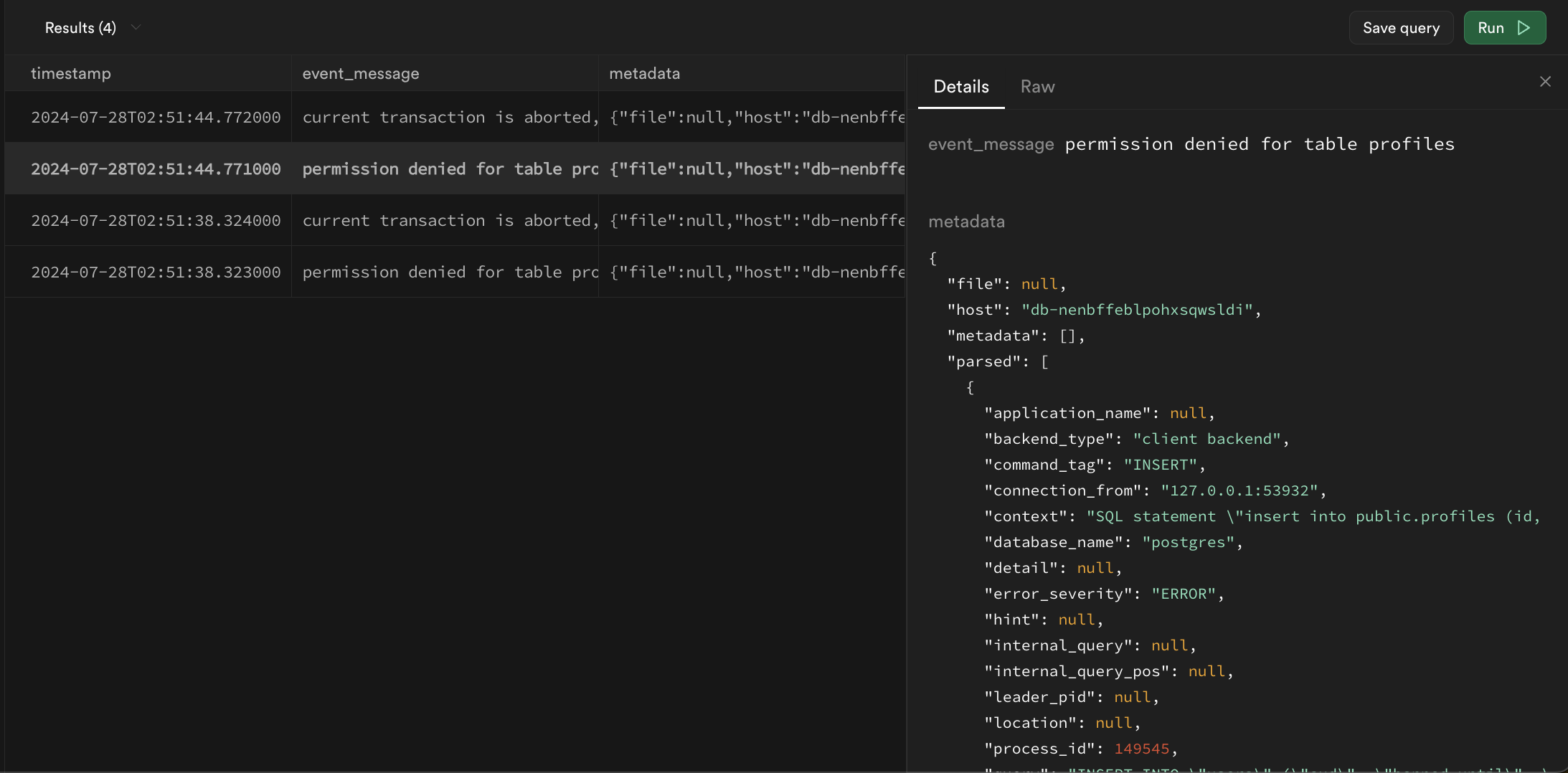
Logs returned by queries may be difficult to read in table format. A row can be double-clicked to expand the results into more readable JSON:
Filtering with regular expressions#
The Logs use BigQuery Style regular expressions with the regexp_contains function. In its most basic form, it will check if a string is present in a specified column.
1select2 cast(timestamp as datetime) as timestamp,3 event_message,4 metadata5from postgres_logs6where regexp_contains(event_message, 'is present');There are multiple operators that you should consider using:
Find messages that start with a phrase#
^ only looks for values at the start of a string
1-- find only messages that start with connection2regexp_contains(event_message, '^connection')Find messages that end with a phrase:#
$ only looks for values at the end of the string
1-- find only messages that ends with port=123452regexp_contains(event_message, '$port=12345')Ignore case sensitivity:#
(?i) ignores capitalization for all proceeding characters
1-- find all event_messages with the word "connection"2regexp_contains(event_message, '(?i)COnnecTion')Wildcards:#
. can represent any string of characters
1-- find event_messages like "hello<anything>world"2regexp_contains(event_message, 'hello.world')Alphanumeric ranges:#
[1-9a-zA-Z] finds any strings with only numbers and letters
1-- find event_messages that contain a number between 1 and 5 (inclusive)2regexp_contains(event_message, '[1-5]')Repeated values:#
x* zero or more x
x+ one or more x
x? zero or one x
x{4,} four or more x
x{3} exactly 3 x
1-- find event_messages that contains any sequence of 3 digits2regexp_contains(event_message, '[0-9]{3}')Escaping reserved characters:#
\. interpreted as period . instead of as a wildcard
1-- escapes .2regexp_contains(event_message, 'hello world\.')or statements:#
x|y any string with x or y present
1-- find event_messages that have the word 'started' followed by either the word "host" or "authenticated"2regexp_contains(event_message, 'started host|authenticated')and/or/not statements in SQL:#
and, or, and not are all native terms in SQL and can be used in conjunction with regular expressions to filter results
1select2 cast(timestamp as datetime) as timestamp,3 event_message,4 metadata5from postgres_logs6where7 (regexp_contains(event_message, 'connection') and regexp_contains(event_message, 'host'))8 or not regexp_contains(event_message, 'received');Filtering and unnesting example#
Filter for Postgres
1select2 cast(postgres_logs.timestamp as datetime) as timestamp,3 parsed.error_severity,4 parsed.user_name,5 event_message6from7 postgres_logs8 cross join unnest(metadata) as metadata9 cross join unnest(metadata.parsed) as parsed10where regexp_contains(parsed.error_severity, 'ERROR|FATAL|PANIC')11order by timestamp desc12limit 100;Limitations#
Log tables cannot be joined together#
Each product table operates independently without the ability to join with other log tables. This may change in the future.
The with keyword and subqueries are not supported#
The parser does not yet support with and subquery statements.
The ilike and similar to keywords are not supported#
Although like and other comparison operators can be used, ilike and similar to are incompatible with BigQuery's variant of SQL. regexp_contains can be used as an alternative.
The wildcard operator * to select columns is not supported#
The log parser is not able to parse the * operator for column selection. Instead, you can access all fields from the metadata column:
1select2 cast(postgres_logs.timestamp as datetime) as timestamp,3 event_message,4 metadata5from6 <log_table_name>7order by timestamp desc8limit 100;